


Blog visual selling

Buy 3D configurator software once, not twice

Most teams who pick 3D configurator software learn the same lessons. Most learn them twice. Here is the short version, written in order, before you sign anything.

Two people in a materials showroom evaluating timber samples laid out on shelves, one holding a wood sample and the other a tablet.

What 3D configurator software has to do#

Four jobs. If a tool only does one or two, it is not configurator software. It is a 3D viewer with marketing copy.

That sentence reads simple. Most of the work is in the four jobs underneath it.

Render the product, fast, on a phone#

Real-time 3D in the buyer’s browser via WebGL, no plugin, no download. The model has to load and stay smooth on a 4G connection. More than half of outdoor living traffic is mobile. A configurator that stutters reads as cheap, no matter what it cost.

Apply the configuration rules#

Which roof goes with which post. Which screen colour is allowed when the structure is anthracite. Which option needs reinforcement. Logic the buyer never sees, but the absence of which is why people order kits that do not fit and turn up at the install with a problem the seller has to fix at their cost.

Price the spec from real numbers#

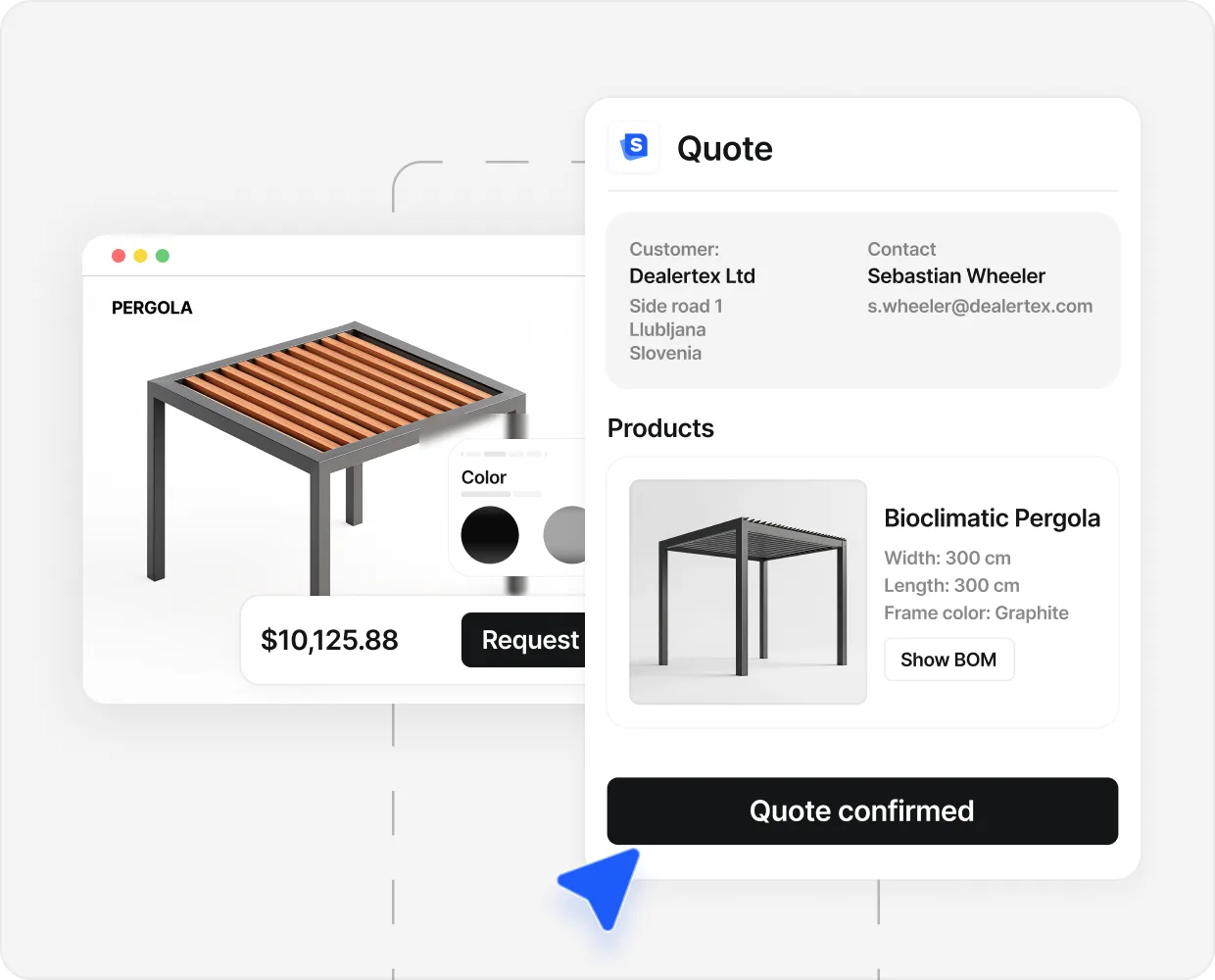
A pricing engine that produces a real, defensible number. Not a “from” price. The actual price for the actual configuration, with options, discounts, regional rates, and taxes baked in. This is the dividing line between 3D configurator software and a pretty 3D viewer.

Send a designed PDF#

The PDF lands in the buyer’s inbox and the seller’s CRM in the same minute. Branded. With the configured spec, the price, the contact info, and a clean cover. The PDF is the moat. Two days later, when a faster competitor sends a handwritten quote, the buyer already has the priced PDF sitting on the desktop.

If the tool you are evaluating only does job one and job two, it is a viewer. If it does one, two, and three but the PDF is an ugly auto-generated A4 with no logo, that is a bigger problem than it looks. A scruffy PDF is the buyer’s first impression of the post-quote experience.

A roofer installing asphalt shingles on a residential roof with a nail gun, photographed from a low angle.

The five buying paths and what each costs#

Five real options. Roughly one of them fits any given manufacturer. The mistake most teams make is starting with path three when path one was the answer all along.

  1. 01

    A premade visual sales system for your category

    A subscription system where the 3D models, configuration logic, and PDF templates already exist for pergolas, garden rooms, carports, awnings, fences, or container rooms. You connect your products, your prices, your brand. You go live.

    Best for: any seller whose product fits one of the existing categories. That is most outdoor living manufacturers, even the ones who think their product is bespoke.

    Configured per seller Live in 1 to 10 days
  2. 02

    A generic 3D vendor (Threekit, Vectary, Emersya, Configure One)

    Render-anything technology. Strong toolkits. Almost everything you need for your category does not exist yet. You (or an agency) spend three to six months building it, and another three to six months tuning it.

    Best for: enterprise sellers with dedicated implementation teams and no off-the-shelf option for their product type. For outdoor living, almost never the right path.

    €20K to €50K+ setup 3 to 6 months to live
  3. 03

    A custom freelancer or agency build

    You hire a 3D developer or a small studio. They build a one-off configurator for your product. The work is real and the result can be excellent, but the maintenance cost is the part nobody quotes you upfront.

    Best for: unusual products with no premade option and an in-house product owner who can run the project. Risky for first-time buyers because the freelancer learns the category on your dime.

    $30K to $60K + maintenance 3 to 6 months to live
  4. 04

    In-house with WebGL or Three.js

    You task your dev team with building it. The renderer is the small part. The configuration rules, pricing engine, PDF generator, multilingual setup, ad-tracking events, and per-product 3D models are the work. Plan for six months to a year.

    Best for: companies whose existing product already includes a 3D experience and who have a senior engineer on staff with WebGL experience. Few outdoor living manufacturers fit that.

    $0 in licence, plenty in salaries 6 to 12 months to live
  5. 05

    Stay with the contact form

    Do nothing. Keep the website you have. The cost is invisible until you measure it: deals lost to faster-quoting competitors, weekends on PDF prep, lead-quality issues that ad spend will not fix.

    Best for: manufacturers without inbound traffic, sellers below €500K revenue, sellers whose average order value is under €5K. For everyone else, this is the most expensive option, just not on a line item you can see.

    $0 software, deals on the floor Status quo

Numbers buyers underestimate#

Four numbers that change the math. All public. None of them get put on the spreadsheet you build before the demo.

  1. 10× Cost gap, year 1 Premade ($6K) vs custom ($60K). Same job. The premade is live in a week.
  2. Close rate, on average Industry close rate is 5 to 8 percent. Teams running a configurator are at 10 to 20 percent.
  3. 4–5× Spring vs winter demand Search interest in pergolas, verandas, garden rooms moves 4 to 5x. Every month not live in spring is the expensive month.
  4. £4.50 Cost per lead, after A UK garden-room manufacturer went from £100+ per lead to £4.50 in two months once the configurator became the lead form.

Sources: industry close-rate ranges; seasonality from Google Trends 2024 to 2026; cost-per-lead figure from a signed program report. Aggregate proof: see the case studies.

The opportunity cost of waiting is the number nobody puts on the buyer’s spreadsheet. If your average sale is 10,000 euros, your close rate is 6 percent, and your traffic is 1,500 visitors a month, every month you delay launching a configurator costs somewhere between two and five deals. The price of the system is rounding error against that.

Eight checks on the demo#

In order. The first three are non-negotiable. The other five are how you tell vendors apart.

  1. 01

    Renders fast on a real phone, on real data

    Open the demo on your phone, on cellular, with the sales rep watching. If the model takes 8 seconds to resolve, your buyers are back in their feed before it loads. Do this test before the conversation goes any further.

  2. 02

    Produces a real, designed, branded PDF

    Ask the rep to send you a sample PDF, generated live, with your logo dropped in. If the PDF is ugly, generic, or missing fields, you will fix that yourself for the next two years. Looks matter here. The PDF is the buyer's first impression of the post-quote experience.

  3. 03

    Prices from your real numbers

    Not a 'from' price. Not a calculator approximation. The real price for the real spec, with regional rates, options, taxes, and discounts baked in. If the rep says 'we just show the spec, you call back with the price later,' you are looking at a viewer, not configurator software.

  4. 04

    Hides public prices for premium positioning

    For premium sellers, the option to gate prices behind a qualifying form is non-negotiable. The configurator should still capture the configured spec and send the priced PDF privately, after a short qualifying step. That is the answer to the race-to-the-bottom problem cheap competitors create.

  5. 05

    Looks like your website, not the vendor's

    Custom typography, your colour system, your photography, your tone. A configurator that sticks out as a third-party widget undoes a chunk of the trust the rest of the site is doing. Ask to see two existing customers' configurators side by side. They should look like different brands, not the same brand twice.

  6. 06

    Fires events to Meta, Google, GA4, your CRM

    Live, on the demo, you want to see the events panel. Configure event, design event, price-shown event, submit event, all firing as the buyer moves through the configurator. Without those events, you cannot tie ad spend to actual configurator engagement, which is the entire reason the funnel works.

  7. 07

    Has customers in your country, in your category, you can call

    Ask for three. Phone numbers, not email addresses. Call them. The number you want to hear is 'leads got better, not just more.' If the only feedback is 'the configurator looks great,' that is a vanity-metrics customer, not a revenue one.

  8. 08

    Has a known, written time-to-launch

    Days, weeks, or months. Get the answer in writing. If a vendor quotes 3 to 6 months for a known product category (pergolas, garden rooms, carports), you are paying for them to learn your category on your dime. Walk.

Close-up of a handshake between a contractor in a plaid shirt and a worker in a workshop uniform, tools visible at the side.

Red flags during a vendor demo#

If you see two of these on a single call, finish the call and look at a different vendor.

One thing sellers tell us repeatedly, often in the first ten minutes of a demo.

We burned ourselves multiple times in marketing companies. I’ll have a defence mechanism built in me over the years.

A US outdoor living manufacturer

That defence mechanism is the right tool to bring to a configurator-software demo. The vendors who handle the questions calmly are the ones who will still be there in month six. The vendors who get prickly are the ones whose contract you should read twice.

When to walk away#

Honest, because the alternative is a refund in month two and a bad quarter for both sides.

If any of those apply, what we usually recommend is six months of ad spend, a clean contact form, and one first install you can use as a real reference. Then come back to configurator software. The buyer-comparison work you did this month will still be useful.

Build versus buy in one paragraph#

Most posts on this drag it out for 1,500 words. It does not need that.

Buy if your product fits a category a vendor already supports (pergolas, verandas, garden rooms, carports, awnings, premium fences, glass enclosures, container rooms). The renderer, the rules, the pricing engine, and the PDF template already exist. You skip the hard year and pay a monthly subscription against a pricing engine that already works.

Build only if your product is genuinely new in 3D-configurator terms (a category nobody supports yet), your engineering team has WebGL experience on staff, and you can fund six to twelve months of work before the first quote leaves the system. For most outdoor living manufacturers we talk to, neither of those conditions hold, and the build conversation is usually a sign that someone read a JavaScript blog post on a Sunday.

If you want the longer version of why this matters, the companion post on 3D product configurators covers the four jobs in more detail. If you sell pergolas specifically, the pergola configurator guide walks through the demo checks and the Monday-inbox shift in detail. For the production-side argument, the post on made-to-order manufacturing covers the configurable BOM and the shop-floor handoff that sit behind the configurator. And the case studies name the numbers behind the close-rate claim.

People also ask.

What is 3D configurator software?

3D configurator software lets a buyer build a manufacturer's product on the website, see it in 3D, and receive a priced PDF quote. It does four jobs: render the product, apply the configuration rules, price the spec from real numbers, and hand a designed PDF to the buyer and the seller's CRM.

How much does 3D configurator software cost?

Custom freelancer builds run 30,000 to 60,000 dollars plus monthly maintenance. Generic 3D vendors (Threekit, Configure One) typically start at 20,000 to 50,000 euros and up for setup. In-house builds with Three.js or WebGL usually cost more than buyers expect once you include the configuration logic, pricing engine, and PDF generation. Premade systems for your category are configured per seller, so the price for your setup needs five minutes of context.

How long does it take to launch?

A premade visual sales system built for a product category can go live in 1 to 10 days. A generic 3D vendor usually needs 3 to 6 months because the rules and models do not exist yet. A freelancer custom build runs 3 to 6 months. In-house from scratch is usually 6 months to a year.

Should I build or buy?

Buy if your product fits a known category that a vendor already supports (pergolas, garden rooms, carports, awnings, fences, container rooms). Build only if your product is genuinely new, your engineering team has WebGL experience on staff, and you can fund 6 to 12 months of work before the first quote leaves the system. Most outdoor living manufacturers we talk to are in the buy bucket and do not realise it.

What is the difference between 3D configurator software and CPQ?

CPQ (configure-price-quote) tools were built for internal sales reps. They sit behind a login. The buyer never touches them. 3D configurator software does the same job (configure, price, quote), but in front of the buyer, on the public website. It is CPQ pulled forward to the homepage.

Does it work on mobile?

It has to. More than half of outdoor living traffic is on a phone. The 3D model has to load and stay smooth on a 4G connection. If a vendor demos only on desktop, ask them to open it on your phone, on your data, before you sign anything.

Can it integrate with my CRM and ad accounts?

A serious tool fires events to Meta, Google Ads, GA4, and the seller's CRM the moment a buyer designs, prices, and submits. Without those events the seller cannot tie ad spend to actual configurator engagement. If a vendor cannot show the events panel live on a demo, treat that as a flag.

Is open-source 3D configurator software a viable option?

Three.js and the surrounding WebGL libraries are open source and free to use. The renderer is not the work. The configuration rules, the pricing engine, the PDF generator, the CRM handoff, the multilingual setup, the ad-tracking events, and the per-product 3D models are the work. Open-source saves you the renderer. It does not save you 90 percent of the project.

Can one configurator serve multiple dealers (B2B)?

Yes. Manufacturers commonly run one parent configurator and roll it across 20 to 100 dealer sites under each dealer's branding, with central reporting. The end buyer (homeowner, contractor, architect) configures on the dealer's site. The dealer closes.

Start selling visually.

See SaleSqueze on your own product line.

Book a Demo
  • Live in 7 days
  • The build is free
  • Ready-made templates